

Views: 236 Author: Gstar Technology Publish Time: 10-27-2026 Origin: Site


Content Menu
● How to Choose a Slim Aluminum MagSafe Wallet: Start With Your Everyday Load
>> Distinguish Maximum Capacity From Comfortable Capacity
● Compare Loaded Thickness, Not Just the Empty Wallet
● Check MagSafe Compatibility With Your Exact Phone and Case
>> Check These Three Interfaces
● Evaluate Magnetic Security Beyond a Straight Pull
>> Why Magnetic Force Claims Need Context
● Make Card Access a Primary Buying Criterion
● Understand What Aluminum Construction Does—and Does Not—Guarantee
>> Inspect Contact Areas, Not Just the Front Panel
● Choose RFID Blocking With a Clear Understanding of Its Limits
>> Shielding and Tap-to-Pay Can Conflict
● Plan for Charging and Tracking Before Buying
>> Wireless Charging Usually Requires Removing the Wallet
>> Magnetic Attachment Is Not Location Tracking
● Use a Five-Step Everyday Functionality Test
>> 1. Load Your Actual Essentials
>> 4. Repeat Your Phone Routine
>> 5. Detach, Charge, and Reattach
● What Overseas Brands Should Specify Before Ordering OEM Wallets
● Develop Your Slim Aluminum MagSafe Wallet With Gstar Technology
>> 1. How many cards should a slim aluminum MagSafe wallet hold?
>> 2. Can I charge my phone wirelessly with the wallet attached?
>> 3. Does an aluminum wallet automatically block RFID?
>> 4. Will a MagSafe wallet work with any phone case?
>> 5. Can a magnetic wallet be tracked if it is lost?
>> 6. What should an OEM buyer request before placing an order?
Gstar Technology (Shenzhen) Co., Ltd. provides OEM services for overseas brands, wholesalers, and manufacturers developing wallets and everyday-carry accessories. When customers ask how to choose a slim aluminum MagSafe wallet without sacrificing everyday functionality, our starting point is straightforward: evaluate the wallet as part of a daily routine, not as an isolated accessory.
An attractive aluminum shell and a magnetic connection are only the beginning. A useful wallet must carry your essential cards, attach securely to your specific phone setup, and remain comfortable when you reach for it repeatedly.
My recommendation is to prioritize usability over the smallest advertised dimensions. The right design saves space without making ordinary tasks harder.

Before comparing finishes or magnetic strength claims, identify what the wallet actually needs to carry.
Lay out the items you use during a normal working day:
- Your primary payment card.
- A backup payment card.
- Your identification or driving license.
- A transit pass or building-access card.
- Emergency cash, if needed.
Then separate daily essentials from occasional items.
A minimalist wallet works best when its capacity matches your real routine. Choosing an exceptionally thin model becomes a false economy if you must carry a second wallet everywhere.
A stated card capacity does not explain how easily those cards can be inserted, selected, and removed.
Embossed cards, unusually thick access badges, and folded banknotes can change the experience. Ask whether the stated capacity applies to standard flat cards and whether cash storage reduces usable space.
For OEM buyers, specify the intended card mix before approving samples. "Holds five cards" is less useful than an agreed loading configuration demonstrated on video.
An empty wallet can look impressively slim while becoming awkward once attached to a phone.
Evaluate the complete combination:
Phone + protective case + loaded wallet + any external clip, stand, or tracker.
This is the thickness your customer actually carries.
| Evaluation point | What to check | Why it matters |
|---|---|---|
| Empty profile | Wallet body and protruding hardware | Establishes the starting dimensions |
| Loaded profile | Your actual cards and folded cash | Reveals everyday bulk |
| Total weight | Phone, case, and loaded wallet together | Affects hand comfort |
| Edge shape | Corners, clips, seams, and openings | Influences pocket entry |
| Camera clearance | Wallet position on the intended phone | Prevents interference |
Do not assume a larger-capacity model is automatically better. If it encourages overloading, the result may undermine the reason for choosing a slim aluminum wallet.
MagSafe compatibility should be verified at the product level, not inferred from a broad "magnetic wallet" label.
Apple's own wallet attaches directly to compatible iPhones or compatible MagSafe cases. That does not establish compatibility for every third-party aluminum wallet, phone, and case combination.
A magnetic attachment also does not mean the wallet supports wireless charging, electronic tracking, or Apple certification. These are separate characteristics.
1. Phone to case: Does the case fit properly and support the intended magnetic accessory?
2. Case to wallet: Does the wallet sit flat without rocking or overlapping the camera area?
3. Wallet to hand: Can you hold and operate the phone comfortably?
For phones without a built-in compatible magnetic system, an accessory ring or magnetic case may provide attachment. However, that addition does not automatically create all the functions associated with MagSafe.
Avoid promising universal compatibility without testing the specific combinations you intend to sell.

A magnetic wallet can feel secure when pulled directly away from the phone yet behave differently when pushed sideways or caught against a pocket.
For everyday evaluation, I would examine three situations:
- Straight separation when deliberately removing the wallet.
- Sideways movement during normal handling.
- Edge lifting when the wallet catches on clothing.
These checks are proposed evaluation steps, not claims about completed Gstar testing.
A force figure is difficult to compare without knowing the test setup.
Ask suppliers to identify:
- The phone or reference surface used.
- Whether a case was installed.
- The direction of loading.
- Whether the wallet was empty or loaded.
- The measurement method and acceptance criteria.
An impressive number without these details tells a buyer little about real pocket use.
Strong attachment should also remain manageable. A wallet that is unnecessarily difficult to remove can become frustrating whenever charging or card access requires detachment.
Slimness matters most when it improves convenience.
Ask yourself: can I retrieve my most-used card without emptying the wallet, bending cards, or repeatedly repositioning the phone?
Common mechanisms offer different compromises:
| Access design | Potential advantage | What to evaluate |
|---|---|---|
| Thumb-push opening | Simple, direct operation | Grip and control at different card counts |
| Pop-up mechanism | Presents cards for selection | Smoothness, retention, and repeated operation |
| Open card slot | Quick access to a designated card | Exposure and retention |
| Plate-and-elastic design | Adaptable storage | Card selection and elastic condition |
| Hinged compartment | Organized access | Added thickness and hinge behavior |
These are design considerations, not guarantees that every example performs alike.
Test the wallet with your least-used card as well as your favorite one. Easy access to the front card does not prove the entire stack is convenient.
Aluminum can provide a rigid structure and a distinctive metal finish. However, the material name alone cannot establish product quality.
Pay attention to the finished assembly:
- Rounded edges and clean openings.
- Consistent surface finishing.
- Secure fasteners and fitted components.
- Protected areas where cards contact the housing.
- A phone-facing surface designed to minimize abrasive contact.
An anodized surface is not a promise of scratch-proof performance. Likewise, a rigid shell does not establish a drop-protection rating.
The most attractive surface is not always the most important one.
Check the wallet's underside, card opening, hinge area, and any exposed fasteners. Remove trapped dust or grit from the contact surface before reattaching it to a phone case.
For private-label projects, define acceptable cosmetic variation using approved physical samples rather than relying only on edited product photographs.
RFID protection should be described as a specific product capability, not as a universal promise that a wallet prevents financial fraud.
For a slim aluminum RFID wallet, ask what card technologies and frequencies the supplier has tested, which compartments are shielded, and whether protection applies in the normal closed configuration.
Do not assume every metal wallet delivers equivalent shielding.
A shielded compartment is intended to restrict relevant wireless communication. Consequently, you may need to remove a physical contactless card before presenting it to a reader.
Apple similarly instructs users to remove NFC-enabled cards, such as hotel keys, from its wallet before use.
This creates a practical choice: prioritize protected storage, convenient card presentation, or a design with clearly differentiated compartments.
An honest product page explains that tradeoff rather than advertising effortless in-wallet tapping and comprehensive shielding without supporting evidence.
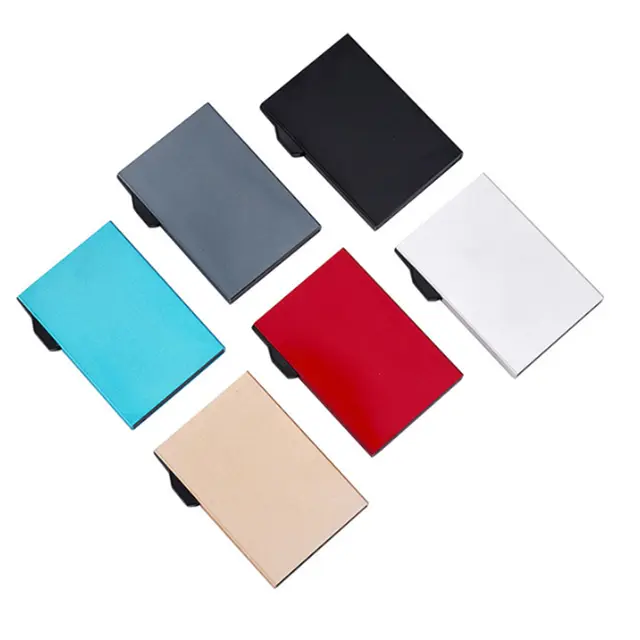
Two frequently confused features deserve separate checks.
Apple instructs users to remove its attached wallet before using relevant MagSafe charging accessories.
Apple also warns against placing credit cards, security badges, passports, or key fobs between an iPhone and a MagSafe charger because magnetic strips or RFID chips could be damaged.
For an aluminum magnetic wallet, plan around removing it before wireless charging unless the manufacturer explicitly documents a different supported configuration.
A useful routine includes a dedicated place for the detached wallet so it does not disappear under papers or get left behind.
A wallet does not gain Find My support merely because it attaches magnetically.
Distinguish among:
- A wallet with no tracking function.
- A wallet incorporating a compatible electronic tracking module.
- A wallet with a holder for a separately purchased tracker.
- A supported Apple wallet offering its specified Find My functions.
Apple describes last-known-location and detachment-related functions for supported wallets. Do not apply those capabilities automatically to third-party products.
For OEM packaging, state exactly what is included and which tracking functions require additional hardware or setup.
Before committing to a wallet—or approving a private-label production sample—run a repeatable evaluation.
Use the intended cards and cash. Check both normal loading and the advertised maximum.
Select each card individually. Note whether removal requires detaching the wallet or disturbing the remaining contents.
Over a soft surface, place the combined phone and wallet into your usual pocket and remove it several times. Observe snagging, rotation, and unintended separation.
Take photographs, type messages, hold the phone during a call, and place it on your usual stand.
Confirm that removing the wallet is convenient and that its temporary storage location is obvious.
For business buyers, document the phone model, case, load, observations, and acceptance criteria. These records are more useful than a vague "sample approved" message.
Gstar Technology's public product information includes metal card holders, MagSafe-compatible designs, and OEM/ODM customization.
For an overseas brand, the strongest starting point is a precise product brief—not simply a request to copy an attractive photograph.
| Specification | What the buyer should define |
|---|---|
| Target customer | Commuter, traveler, minimalist, or gift buyer |
| Carry requirements | Card types, intended capacity, and cash needs |
| Physical dimensions | Empty and loaded size limits |
| Compatibility | Named phones and cases |
| Card access | Preferred mechanism and required access sequence |
| Finish | Color reference and approved physical sample |
| Functional claims | Evidence required for RFID, attachment, and tracking |
| Quality agreement | Inspection criteria and approved reference sample |
Keep optional functions separate. A stand, tracker compartment, money clip, or additional card layer should earn its place by solving a customer problem.
For Gstar projects, use sampling discussions to resolve these tradeoffs before finalizing packaging claims, pricing, and production requirements.
The best design is not necessarily the thinnest or the most feature-packed. It is the one that carries the right items, attaches reliably to the intended setup, and keeps routine actions straightforward.
For overseas brands, wholesalers, and manufacturers, Gstar Technology (Shenzhen) Co., Ltd. is a starting point for discussing custom aluminum wallets and related OEM products.
Send your target market, intended phone-and-case combinations, card capacity, preferred finish, quantity estimate, and packaging requirements. Request a sample proposal that identifies included features, compatibility limits, and the checks needed before production approval.
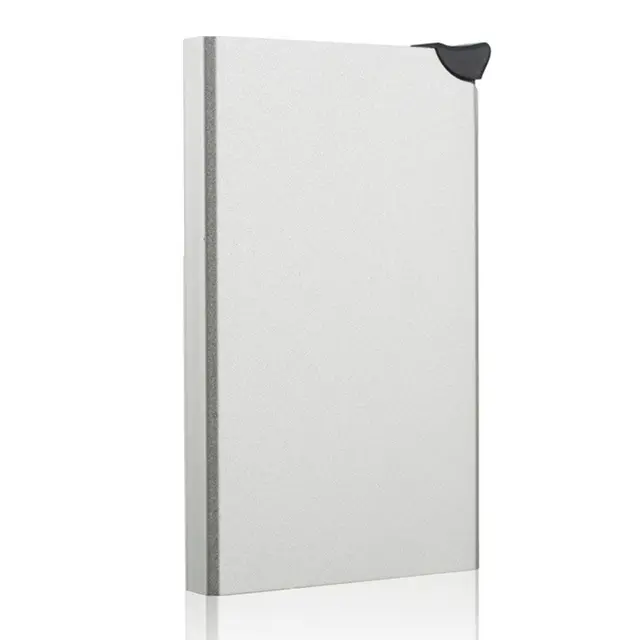
Choose capacity around your daily essentials. Verify performance with your actual card types rather than selecting solely by the largest advertised number.
Plan to remove it first. Apple instructs users to remove attached wallets for its relevant MagSafe charging accessories and warns against placing sensitive cards between the phone and charger.
No. Material alone is not sufficient evidence. Ask for model-specific information about tested frequencies, compartment coverage, and the configuration in which shielding works.
No. Case design, magnetic compatibility, camera clearance, surface geometry, and wallet dimensions can affect the result. Verify the exact combination.
Only if it includes a supported tracking capability or accommodates a separate tracker. Magnetic attachment alone provides no location function.
Request a detailed specification, representative samples, compatibility information, agreed inspection criteria, and evidence supporting advertised functions. Confirm model-specific commercial terms directly with the supplier.
Hot Tags: China, Global, OEM, private label, manufacturers, factory, suppliers, manufacturing company


