

Views: 365 Author: Professor Leon Publish Time: 08-22-2026 Origin: Site


Content Menu
● 1. The Physics of the Click: Understanding the Magnet Array
● 2. Material Science: Balancing Durability and Signal Transparency
● 3. How to Use a MagSafe Wallet: A Step-by-Step Workflow
● 4. The Downsides and Technical Limitations
● 5. Sourcing MagSafe Wallets: A Procurement Framework for B2B Buyers
● 6. Industry Standards and Certifications
● 7. Partnering with a Specialized Manufacturer
● 8. Frequently Asked Questions
● 9. Choosing the Right Supplier
11 min read
The first time a buyer picks up a MagSafe wallet and snaps it onto a phone, the reaction is usually the same. A slight pause. A second snap test. Then the question: How is this thing actually staying on?
It looks like a simple leather pouch with some magnets sewn in. But the engineering behind that satisfying click involves precise magnetic field alignment, material science trade-offs, and manufacturing tolerances measured in fractions of a millimeter. For procurement professionals, understanding these mechanics is not optional — it is the difference between a product that sells itself and one that generates returns.
This guide breaks down the technology, the materials, and the quality benchmarks that define a good MagSafe wallet. It also provides a framework for evaluating suppliers, so you can source with confidence rather than guesswork.
A MagSafe wallet attaches to a phone through a carefully engineered magnetic field, not just a single strong magnet. The iPhone 12 and later models contain a circular arrangement of 18 magnets with alternating polarity, surrounding a central alignment ring. The wallet replicates this pattern, creating a "self-aligning" system that snaps into the correct position every time.
The holding force is substantial. Apple's technical specifications indicate a pull force of roughly 700–800 grams for the MagSafe connection. That is enough to hold the wallet securely during daily use, but not so strong that removal becomes difficult.
The alternating polarity pattern is critical. Adjacent magnets face opposite directions, creating a dense, interlocking magnetic field. This design increases the surface area of the magnetic connection, distributing the load across the entire ring rather than concentrating it at a few points.
For manufacturers, this means the wallet must replicate the exact same pattern. A wallet with fewer magnets or a weaker array will not align properly and may slide around. Buyers should request magnet configuration details from suppliers before committing to an order.
The distinction between shear force and pull force matters in daily use. Pull force is the vertical force required to detach the wallet — think of pulling it straight off the phone. Shear force is the lateral force, such as when the phone slides out of a pocket or bag.
A well-designed wallet resists shear force effectively. If the wallet only resists pull force, it will detach when the phone is pulled from a tight pocket. This is a common failure point in cheap knockoffs, where the magnet array is strong enough to pass a simple "stick test" but fails under real-world lateral stress.
The central magnet inside the phone works with the wallet's alignment ring to guide positioning. This ensures the wallet sits correctly not just for aesthetics, but for wireless charging compatibility. Misalignment can cause charging issues, especially if the wallet is left on the phone during charging.
Manufacturing tolerance is the key metric here. The magnet placement must be accurate to within fractions of a millimeter. A deviation of even 0.5mm can make the wallet feel "loose" or cause it to rock slightly when attached. This is why in-house CNC machining and precision assembly matter — they control the tolerances that determine perceived quality.
The outer shell of a MagSafe wallet must balance durability, aesthetics, and magnetic transparency. Not all materials perform equally, and the choice affects both the product's lifespan and its functionality.
Most premium MagSafe wallets include an RFID-blocking layer between the outer shell and the cards. This is typically a thin sheet of aluminum or a specialized conductive fabric. It works on the Faraday cage principle — the conductive layer blocks electromagnetic signals, preventing skimmers from reading contactless cards through the wallet.
Not all manufacturers include this layer. It adds cost and complexity. Buyers targeting premium price points should specifically request RFID-blocking materials and verify their presence through testing.
The outer material affects grip, durability, and how the wallet interacts with the magnetic field.
Leather (PU vs. Genuine): Genuine leather offers a premium feel but requires careful tanning to maintain flexibility. PU leather is cheaper but may peel over time. Both work magnetically, but the thickness of the material affects the wallet's overall profile.
Aluminum (CNC Machined): Aerospace-grade aluminum is a growing trend. It offers a slim profile and excellent scratch resistance. Crucially, aluminum is non-ferrous — it does not block magnetic fields. However, it requires precise machining to ensure the magnet housing fits correctly. A poorly machined aluminum shell can interfere with the magnetic connection.
Plastic/TPU: The lowest-cost option. Plastic is non-magnetic, but it often requires a metal plate insert to achieve sufficient magnetic pull. This adds thickness and can interfere with wireless charging if the metal plate is positioned incorrectly.
The most common failure point in MagSafe wallets is the magnet array detaching from the outer shell. This happens when manufacturers use standard glue instead of structural adhesives.
Reputable OEMs use high-temperature structural adhesives, such as 3M VHB tapes, which withstand daily flexing and temperature changes. A wallet left in a hot car can reach temperatures exceeding 60°C. Standard glue softens and fails; structural adhesives hold. Buyers should ask suppliers about their bonding process and adhesive specifications.
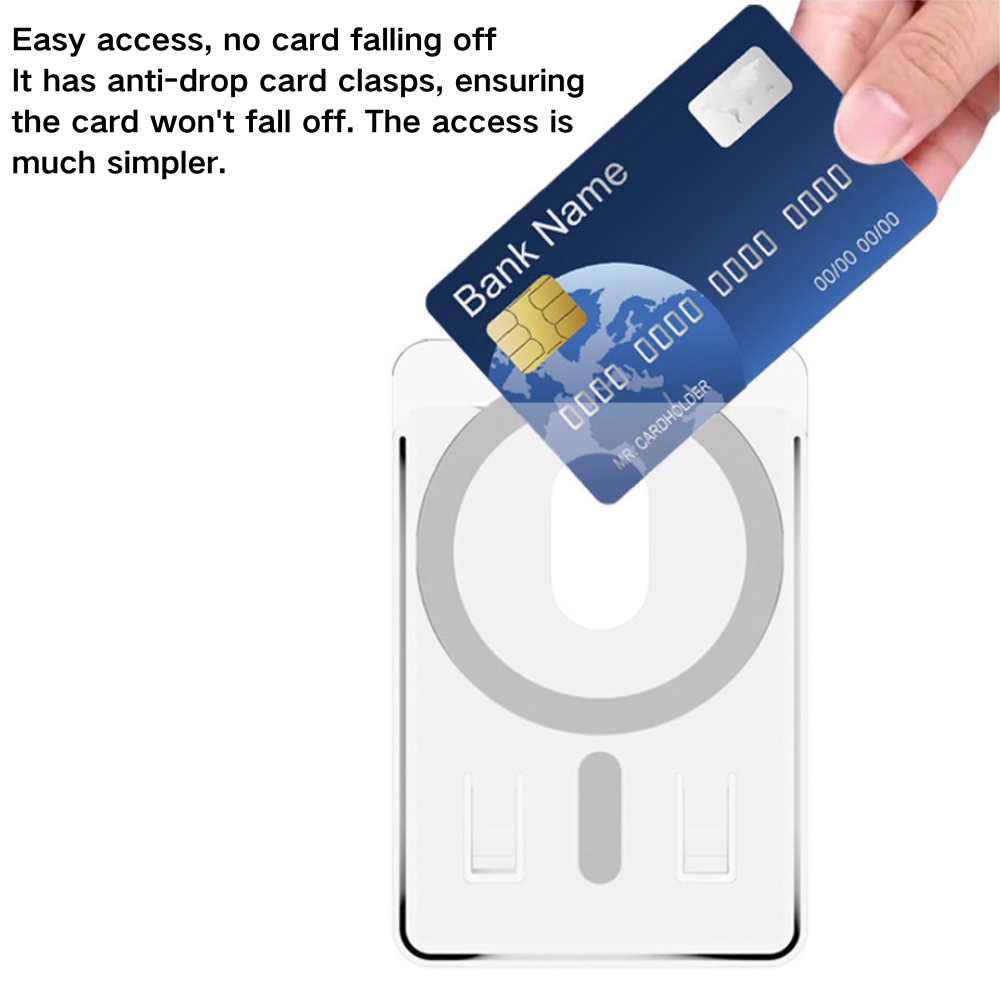
Understanding how the product works from the user's perspective is important for creating accurate product listings and reducing support queries.
When a MagSafe wallet is first attached to an iPhone running iOS 15 or later, a "Connect" animation appears on the screen. This triggers the setup process for Find My tracking.
To pair the wallet, the user navigates to Settings > General > About > MagSafe Wallet and taps "Connect." If this is skipped during initial setup, the same menu offers an "Add Later" option. This is a useful feature to mention in product listings, as many users are unaware it exists.
Most MagSafe wallets hold 2–3 cards. The interior typically features a notch or pull-tab design to make card removal easier. Users insert cards with the pull-tab facing outward for quick access.
When removing the wallet, users should slide it off sideways rather than prying it off vertically. This reduces stress on the adhesive and the magnet housing, prolonging the product's lifespan.
A key technical limitation: a wallet with cards inside cannot be charged via MagSafe. The cards block the charging frequency. An empty wallet can remain attached during charging without issue — the magnet array does not interfere with the Qi charging coil.
This limitation should be clearly communicated in product listings. Customers who expect to charge their phone with the wallet attached and cards inside will be disappointed.
No product is perfect. MagSafe wallets have inherent limitations that buyers should understand before sourcing.
The common question — does a MagSafe wallet drain your battery? — has a straightforward answer: no. A static magnetic field does not draw power. However, if the wallet interferes with wireless charging alignment or traps heat, it can slow charging speeds and cause minor thermal stress.
This is a thermal issue, not a battery drain issue. The distinction matters for customer communication.
Adding a wallet makes the phone heavier and less pocket-friendly. The thickness also creates a problem: the protruding camera module on modern iPhones means the wallet must be designed with a cutout or raised area. Without this, the phone rocks when placed on a flat surface.
Daily removal can weaken the magnetic pull over time, particularly if the magnet housing is inferior. High-quality manufacturers use multiple smaller magnets rather than one large one, distributing stress more evenly. This is a subtle but important quality indicator for buyers.
When evaluating suppliers, technical specifications matter more than marketing claims. Here is a framework for assessing potential manufacturing partners.
Pull Force Testing: Request datasheets showing the wallet's actual pull force in Newtons or grams. It should meet or exceed the 700g+ standard. A supplier who cannot provide this data is not manufacturing to specification.
RFID Blocking Verification: Test the shielding layer with an RFID reader. If the supplier cannot demonstrate this, the layer may be cosmetic rather than functional.
Environmental Testing: Ask about temperature cycling tests (-20°C to 60°C). This verifies the adhesive survives extreme conditions without failure.
MagSafe wallets offer significant customization potential. Buyers can request:
Custom magnet arrays (stronger pull for thicker cases)
Mixed materials (CNC aluminum frame with leather card slot)
Branded private labeling
Custom interior capacity (2 vs. 3 cards)
These options affect MOQ and lead times. Custom magnet tooling, for example, requires new molds and longer production timelines.
A critical distinction: manufacturers who CNC the metal housing in-house versus those who outsource assembly. In-house machining provides better tolerance control and quality assurance. Outsourced assembly introduces variables that are harder to manage.
For high-volume buyers — such as online store sellers — production capacity matters. A supplier with monthly capacity in the hundreds of thousands can prevent stockouts during peak seasons.
Compliance with international standards is non-negotiable for global distribution.
MagSafe wallets sold in the EU and US typically require:
CE (safety standards)
FCC (electromagnetic interference testing)
RoHS (restriction of hazardous substances)
Third-party labs test magnetic field strength to ensure the wallet does not interfere with pacemakers or other electronic devices. Buyers should request certification documentation before placing orders.
MFM is Apple's official licensing program. It guarantees compatibility with Find My tracking and optimized charging speeds. However, it is expensive and requires Apple's approval process.
Many non-certified wallets function perfectly well but lack Find My integration. For buyers targeting premium price points, MFM certification can justify a higher retail price. For budget lines, it may not be worth the cost.
After reviewing the technical requirements, the question becomes: which supplier can meet these standards consistently?
As a manufacturer with over 13 years of experience in RFID wallets and mobile accessories, we design our MagSafe wallets to meet the exact specifications outlined above — from the 18-magnet array to the RFID shielding layer. Our in-house CNC machining holds tolerances of ±0.05mm on the magnet housing, ensuring consistent pull force across every unit.
With a monthly production capacity exceeding 300,000 units, we support wholesale and e-commerce brands that need reliable scaling without compromising quality. Whether you need a custom leather finish, a specific magnet strength, or a branded private label, our engineering team can adapt the core design to your product roadmap.
Every batch undergoes pull-force testing and RFID verification before shipment, aligning with the QC checkpoints discussed earlier. We handle CE, FCC, and RoHS documentation for our clients, simplifying the import process for global distributors.
If you are evaluating suppliers for your next MagSafe wallet line, we invite you to review our technical capabilities and discuss your project requirements.
---
The primary purpose is convenience — eliminating the need for a separate front pocket wallet. It holds 2–3 essential cards (ID, credit card, transit pass) and attaches directly to the phone's back using the built-in magnet array. For B2B buyers, it represents a high-margin accessory that complements phone case sales.
No. The static magnetic field does not draw power from the battery. However, if the wallet is left on during wireless charging with cards inside, the cards can block the charging frequency, causing the phone to heat up slightly and slow charging. This is a thermal issue, not a battery drain issue.
The main downsides include: (1) Limited card capacity (usually 2–3 cards); (2) Incompatibility with non-MagSafe cases unless a metal ring is added; (3) Potential interference with wireless charging when cards are present; (4) The risk of losing the wallet if the magnetic connection fails due to poor manufacturing.
Simply align the wallet's magnet array with the back of your iPhone (12 or later). It will snap into place. For Find My tracking, go to Settings > General > About > MagSafe Wallet and tap "Connect." To remove, slide it off sideways rather than pulling straight up to preserve magnet strength.
Only if the case has a built-in magnet ring (MagSafe-compatible). Standard cases without magnets will not hold the wallet securely. For OEM buyers, this means offering a matching MagSafe case and wallet bundle is often more profitable than selling the wallet alone.
Most designs hold 2–3 cards. Adding more cards increases thickness, which weakens the magnetic pull and may cause the wallet to detach. Manufacturers can customize the internal cavity depth to fit 3 cards snugly, but this requires precise material engineering.
---
MagSafe wallets are precision-engineered products. The magnet strength, adhesive quality, and RFID shielding determine whether the product succeeds or fails in the market.
Choose a supplier who can demonstrate: documented pull-force testing, in-house CNC capabilities, and a clear quality control process. These are not optional extras — they are the baseline for a reliable product.
Avoid suppliers who: cannot provide test data, use standard adhesive instead of structural bonding, or outsource assembly without clear quality oversight.
The manufacturing partner you choose determines your product's quality. Talk to our team about your OEM or ODM project today.
Available for global distribution to the US, EU, and APAC markets. Subscribe to our emails for industry insights on mobile accessories.
Apple Support. "Add your iPhone Wallet with MagSafe to Find My on iPhone." https://support.apple.com/en-us/105119
Apple. "MagSafe Charger Specifications." https://www.apple.com/magsafe/
FCC. "Electromagnetic Compatibility (EMC) Certification." https://www.fcc.gov/oet/ea/electromagnetic-compatibility-emc
European Commission. "CE Marking." https://single-market-economy.ec.europa.eu/single-market/ce-marking_en
RoHS Directive. "Restriction of Hazardous Substances." https://environment.ec.europa.eu/topics/waste-and-recycling/rohs-directive_en


